Managing System Settings and Processes PDF

Building a Web Site > Web Layout Editor Application > Creating an External URL Link


Creating an External URL Link

To create an external URL link:

  1. Select the page in the Web Page Hierarchy Pane under which you want to locate the new URL.
  2. In the Page Links Pane, click Add.
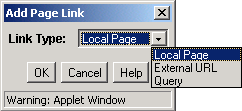
  3. The Add Page Link screen is displayed:

  4. Select External URL, and click OK.
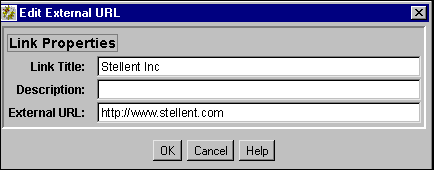
  5. Enter information about the URL into the Edit External URL screen. Observe the following field descriptions:
  6. Feature
    Description

    Link Title field

    This text is displayed as the link.

    Description field

    Optional field, text or HTML. This text is displayed under the link to provide additional description about the link destination.

    External URL field

    The address of the link’s destination. It must start with http://.

  7. Click OK.
  8. Refresh the browser to display the new page.

Copyright © 1996, 2007, Oracle. All rights reserved.